

Sherlock Scenario
Recently, Binz received a request via email to create a 3D model for a client’s family. Upon downloading and opening the provided files, he observed unusual system behavior that raised suspicion. Acting on instinct, he promptly deleted the files; however, he remained concerned that the system might still be compromised.
In response, we acquired a full memory dump from the affected machine for in-depth malware analysis. The objective of this investigation is to identify indicators of compromise (IOCs) that can be integrated into our Endpoint Detection and Response (EDR) systems, as we suspect the use of a novel and sophisticated infection vector.
Analysis Process
I started with a .raw file provided by HackTheBox, and my task was to complete ten questions. Let’s begin with the first question.
Task 1: When does the suspicious process start?
The first task is to find the start time of the suspicious process. We can use some of the plugins provided by Volatility3, such as pslist, pstree, and psscan.
python3 ~/Desktop/volatility3/vol.py -f memory.raw windows.pslistI noticed two suspicious processes:
HxOutlook.exemmc.exe
When I used the filescan plugin to filter by .pst file, the results were empty. However, after analyzing the mmc.exe process, I discovered the suspicious file was family_image.msc.
Process Details:
PID:        3120PPID:       3144Process:    mmc.exeOffset(V):  0xa78511394080Threads:    14Session:    1Wow64:      FalseStart (UTC):2024-09-05 15:58:11.000000ExitTime:   N/A
ImagePath: \Device\HarddiskVolume3\Windows\System32\mmc.exeCommandLine:"C:\Windows\system32\mmc.exe" "C:\Users\IEUser\AppData\Local\Temp\MicrosoftEdgeDownloads\91617dd3-f62f-4c28-ba7d-8769251040b3\family_image.msc"FilePath: C:\Windows\system32\mmc.exeKey Finding:
Microsoft Management Console (mmc.exe) is a legitimate Windows process, but the fact that it opens an .msc file from the MicrosoftEdgeDownloads folder in Temp is highly suspicious.
Note (What are Microsoft Management Console and .msc files?)
Microsoft Management Console (MMC) is an add-on utility in Microsoft Windows that allows users to centrally manage and maintain their system. The MMC provides access to various management utilities such as Device Manager, Event Viewer, Performance Monitor, and Disk Management.
.msc file is a MMC Console file: a configuration file that defines which snap-ins will be loaded and how the console will be displayed.
Therefore, we can easily find the answer to be 2024-09-05 15:58:11
Task 2: What is the size of the archive file containing the malware in bytes?
I used a plugin to find the hold file but got no results because the victim had deleted all the files. So I decided to use the strings command and filter by filename.
It appears the victim downloaded a file named family_image.zip. In this case, the user deleted the file, so I can no longer check its size by looking at the filesystem. However, traces of the ZIP file still remain in the RAM dump. Standard ZIP file structures have signatures that are easily found in hex:
- Local File Header:
50 4B 03 04. - Central Directory File Header:
50 4B 01 02. - End of Central Directory:
50 4B 05 06.
You can read more here. Even though ZIP files are scattered throughout the dump and cannot be reassembled, Central Directory still shows you which files are in the ZIP, and the Compressed Size of each file. From there, you can add them up plus the overhead header to get the ZIP size.
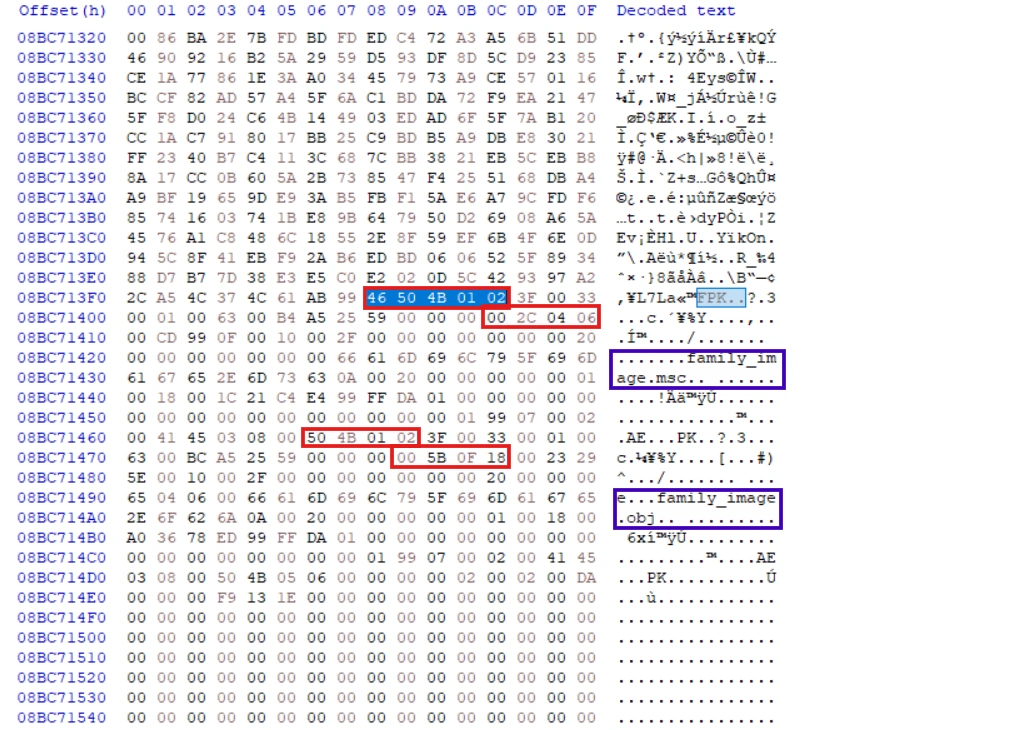
We see that the first file has a compressed size of 0x180f5b, and the second file has a compressed size of 0x6042c.
0x180f5b + 0x6042c = 0x1e1387Converting 0x1e1387 to decimal gives us 1,971,079 bytes. In addition, a ZIP file contains not only “compressed data,” but also Local File Headers for each file, Central Directory headers for each file, End of Central Directory, and length variables such as FileName, ExtraField, Comment, etc.
1,971,079 (compressed data) + 354 (headers/metadata) = 1,971,433 bytesAnother way is to use Edge’s HISTORY file, which is much simpler. Just use the dumpfile plugin and sqlite3 to open it.
Task 3: Unzip the malware archive, then list its files in alphabetical order.
As we analyzed in task 2, the answer is family_image.msc,family_image.obj.
Task 4: How many native (NAT) modules are loaded in the suspicious process?
First, we need to understand what a native module is.
Note (What is native modules?)
When a process runs, it loads many pieces of code from elsewhere into memory, for example: kernel32.dll, ntdll.dll, user32.dll, etc. These are collectively called modules.
Native means code that runs directly on the CPU (x86/x64), in the Windows PE format. Examples include standard Windows DLLs/EXE files.
The opposite is managed (usually .NET), for example, .NET assemblies running through the CLR (Common Language Runtime).
To find native modules loaded into the suspicious process, we can use the dlllist plugin.
python3 ~/Desktop/volatility3/vol.py -f memory.raw windows.dlllist --pid 3120The output has a total of 102 modules loaded. However, we only include the native modules. Therefore, removing the .ni.dll files, the final result will be 98.
Task 5: Submit the assembly address of all CLR modules in Ascending order.
To find the assembly address, we will use a tool called MemProcsFS to extract artifacts from the memory file.
MemProcFS.exe -device D:\sharedVB\mnt\novitas\memory.rawOnce we have the minidump file of the suspected process, we can use WinDbg to analyze it.
We can see the assembly addresses of the modules. In addition to the four modules mentioned earlier, we also discovered another module named Ad00bce9305554c87927205710b17699f.
Arranged in order, we get the result:
0000000004e62fd0,0000000004e630f0,0000000004e63690,0000000004e638d0,0000000004e63b10Task 6: What is the name of the malicious module loaded?
As previously analyzed, the mathematical module is named Ad00bce9305554c87927205710b17699f.
Task 7: Submit md5 of DLL file
The next task is to extract DLL file from memory and obtain its md5 code. We will still use Windbg for this task. We will use the lmDvm command to view detailed information about the module.
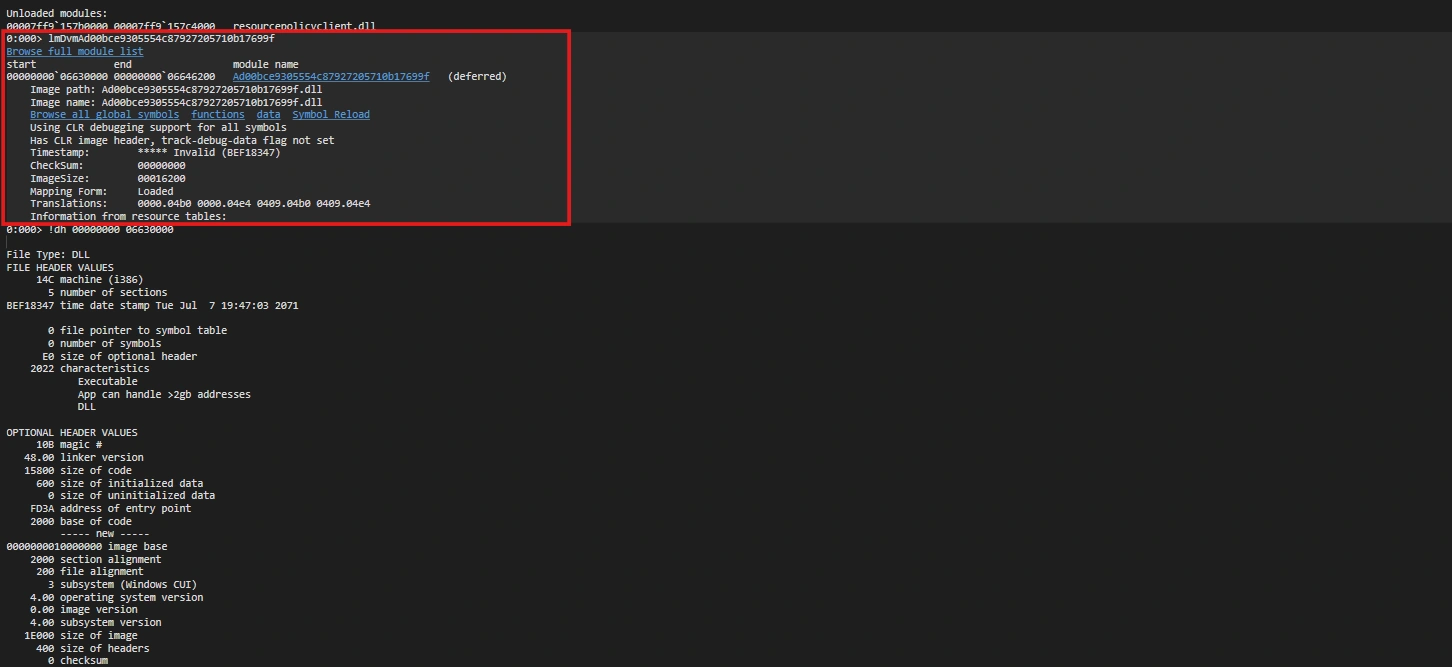
Once we have the start and end addresses, we can use the .writemem command to dump the module file.
.writemem "D:\sharedVB\mnt\Ad00bce.dll" 00000000`06630000 00000000`066461ffThe MD5 hash can be easily found as follows: e67f5692a35b8e40049e30ad04c12b41
Task 8: What is the xor key used to obfuscate strings in the dll?
This DLL file is written in C#, so we will use dnSpy to parse it. The program is very complex, making parsing very difficult.
Right in the first class, Ae555509b7d114e538171cd15b0c6bd9a, we see calls to the Base64 encoding function.
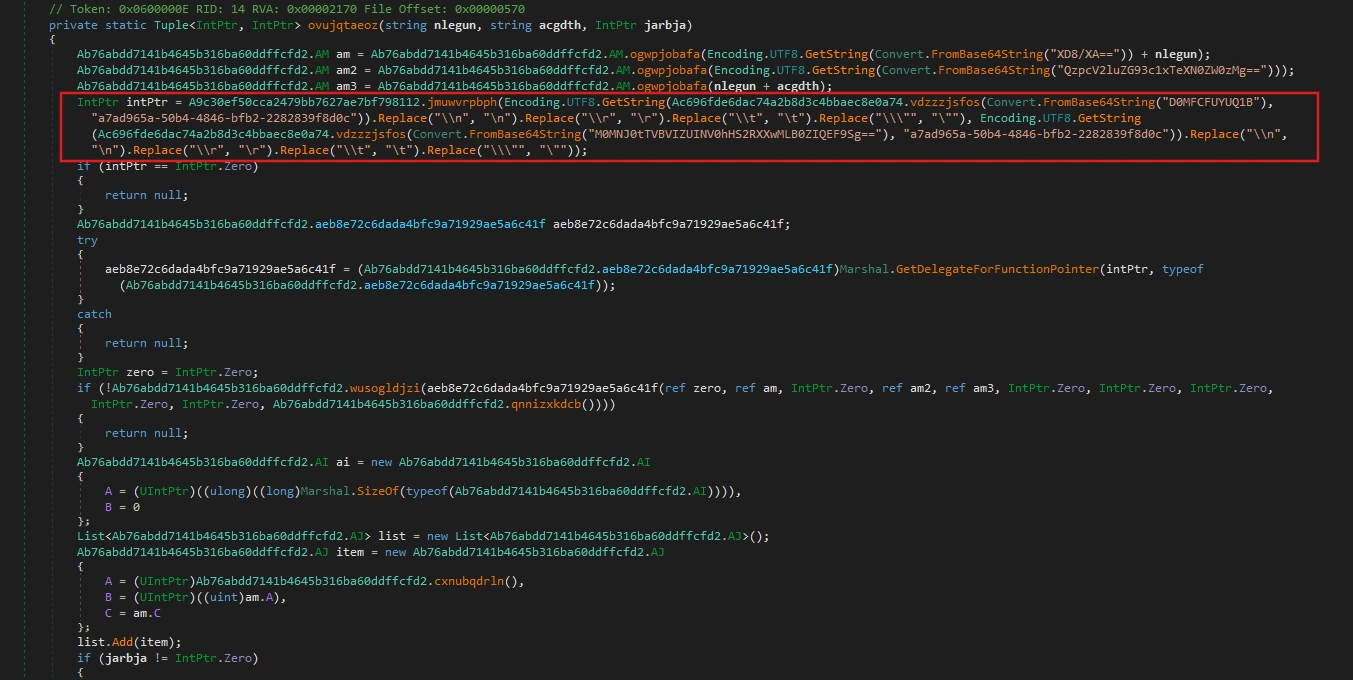
Delving deeper into the class Ac696fde6dac74a2b8d3c4bbaec8e0a74, we find it contains a function vdzzzjsfos() - this is the function that performs the XOR operation with the second parameter as the key.
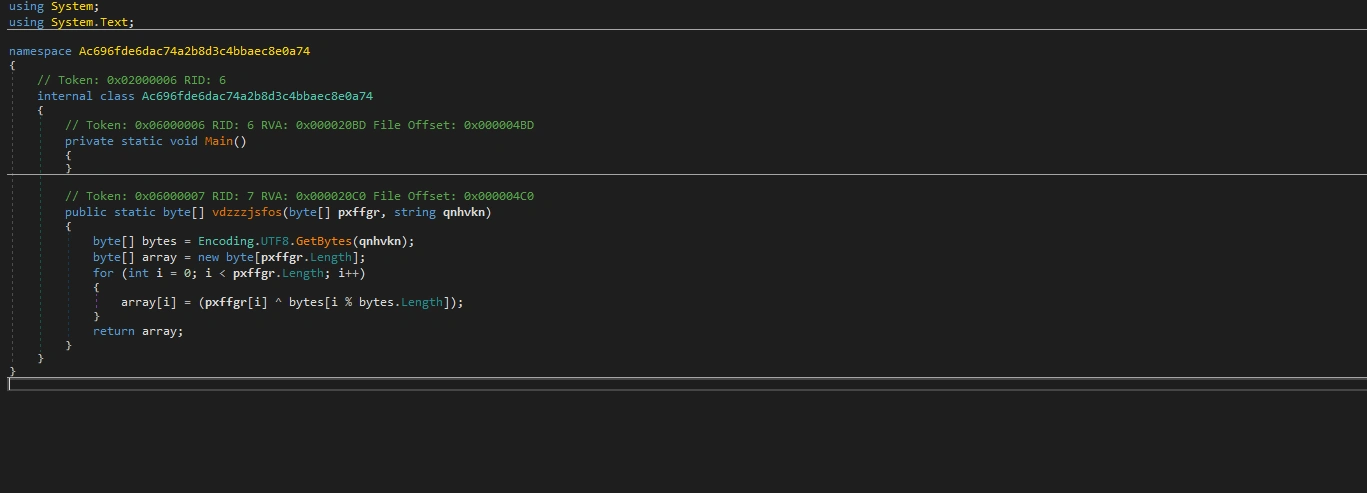
Therefore, the key here is a7ad965a-50b4-4846-bfb2-2282839f8d0c.
Task 9: What is the IP of C2 server and port the malware connects to?
After uploading the malicious DLL file to VirusTotal, we can see that it is a variant of Cobalt Strike. Therefore, we can use the following script to parse the configurations in memory.
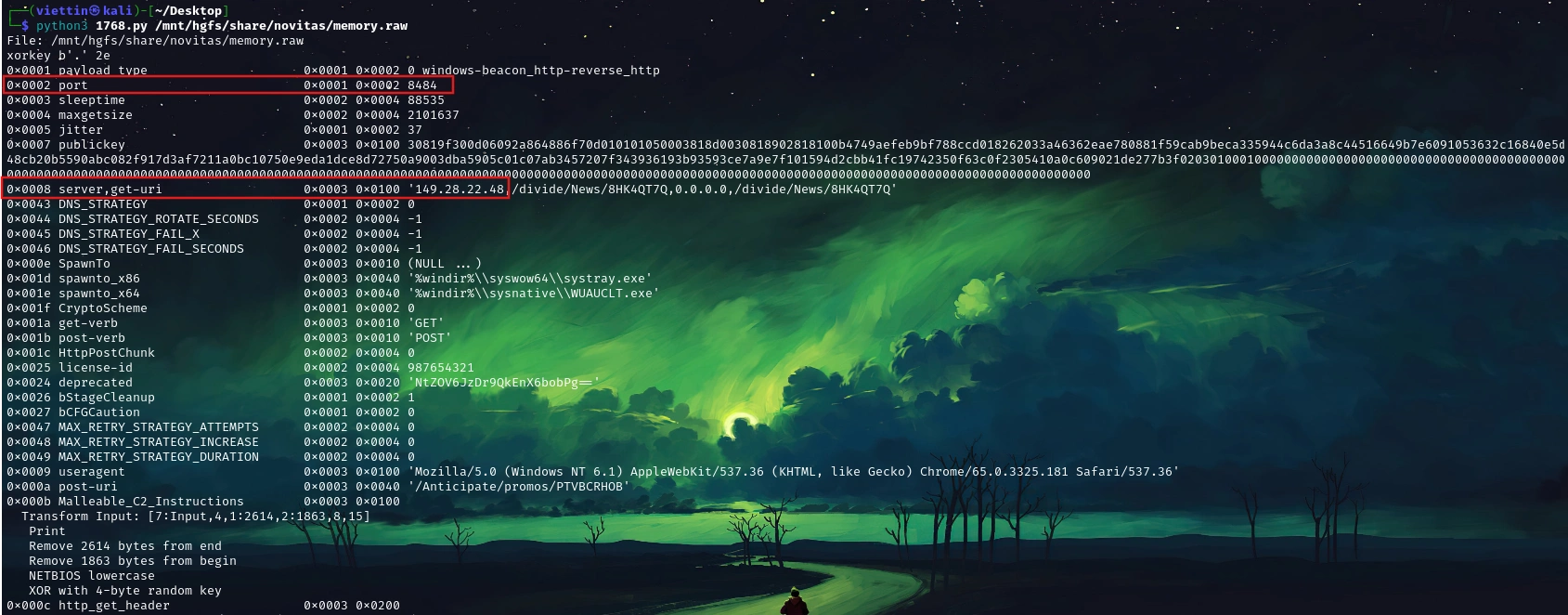
So the IP address and port of the C2 Server are 149.28.22.48:8484.
Task 10: What is the md5 hash of shellcode used for the final stage?
In class A350ef0f96fc540f795e5f85e7441820a, we see a function called emlajrwidb() that performs the following functions:
public bool emlajrwidb(string fmgdmb, Y jpbpzh, X ccnepm) { if (!this.efppbgegmi(jpbpzh)) { return false; } string text = fmgdmb; if (ccnepm != X.A) { if (ccnepm != X.C) { goto IL_5F; } } else { try { text = File.ReadAllText(fmgdmb); goto IL_5F; } catch (Exception) { return false; } } string text2 = ""; int num = 1; string environmentVariable; while (!string.IsNullOrEmpty(environmentVariable = Environment.GetEnvironmentVariable(string.Format("{0}_{1}", fmgdmb, num), EnvironmentVariableTarget.Process))) { text2 += environmentVariable; num++; } text = text2; IL_5F: if (string.IsNullOrEmpty(text)) { return false; } if (jpbpzh == Y.B) { this.B = text; } else { this.A = text; } return true; }This function retrieves the payload from the ENV process and stores it in the variable this.B. We can use the envars plugin to extract all the process’s environment variables.
python3 ~/Desktop/volatility3/vol.py -f memory.raw windows.envars --pid 3120After some searching, we will find the function andxkgfxxp that performs the payload decoding in the class Abddcbaea7acb47039a7d3800a0862e5b.
internal static byte[] andxkgfxxp(string lpxpmd) { string text; try { text = lpxpmd.Replace("A$+", string.Empty); } catch (Exception) { return null; } char[] array; try { array = text.ToCharArray(); } catch (Exception) { return null; } try { Array.Reverse(array); } catch (Exception) { return null; } string text2 = new string(array); string str; try { str = new string('=', (4 - text2.Length % 4) % 4); } catch (Exception) { return null; } byte[] result; try { result = Convert.FromBase64String(text2 + str); } catch (Exception) { result = null; } return result; }Perform the decoding and you will get the hash code: f7efce4bac431a5c703e73cce7c5f7c7.
Conclusion
This investigation demonstrates the sophistication of the Novitas malware campaign, which uses legitimate Windows tools and advanced obfuscation to evade detection. By analyzing memory artifacts, we identified critical IOCs across the attack chain:
- Malicious Module Hash:
e67f5692a35b8e40049e30ad04c12b41 - XOR Key:
a7ad965a-50b4-4846-bfb2-2282839f8d0c - Shellcode Hash:
f7efce4bac431a5c703e73cce7c5f7c7 - Suspicious Pattern:
mmc.exeloading.mscfiles from temporary directories
The attack leverages code obfuscation, Cobalt Strike C2 infrastructure, and environment variable-based payload staging. Memory forensics proved essential in reconstructing the attack chain and identifying indicators that would evade signature-based detection. Organizations should prioritize memory analysis capabilities in their EDR systems to defend against similar threats.